
Shenzhen, Guangdong, China – October 19, 2026
Picking the right USB to PS/2 adapter sounds easy enough—until an old keyboard or mouse just won’t respond. And for global buyers, things get trickier: different USB standards, PS/2 port layouts, operating systems, and seller descriptions all come into play. A dependable PS/2 adapter should give you stable signal conversion, decent build quality, and compatibility info that’s actually clear.This guide sticks to the details that matter in real use. Does the adapter support one PS/2 device, or both keyboard and mouse? A dual-port model might need color-coded plugs, while some compact adapters only work with devices that already have internal conversion circuits. Testing should cover startup behavior, key response, mouse movement, and how things hold up after a few hours. Yep, small details matter.Good quality evidence isn’t always easy to find, either. Some listings say “universal compatibility” but never name the supported systems or chipsets. That wording should make you pause. Before ordering, check connector materials, cable length, return policies, and supplier documentation. USB 2.0 support is often enough, but it doesn’t guarantee flawless performance.Real-world limits are still there. An adapter may work fine with a classic keyboard but fail with a gaming mouse. Another model might run on Windows yet act inconsistently on Linux or older hardware. That can be frustrating. It also shows why broad rankings need careful testing, not just attractive packaging. The models discussed here are compared by compatibility, construction, usability, and evidence quality, so international buyers can choose with fewer surprises.
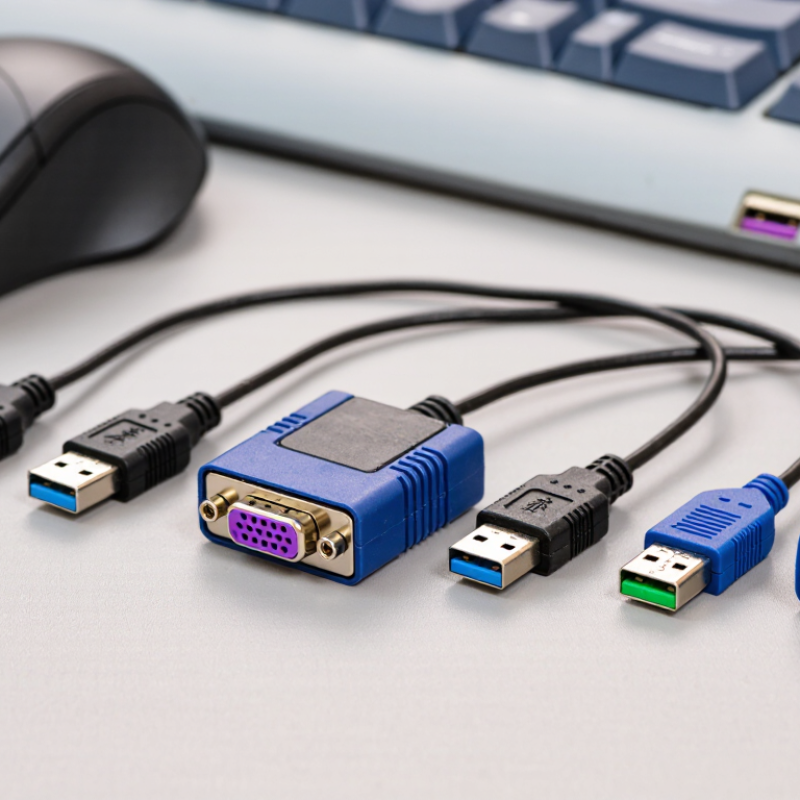 USB to PS2 Adapters: Purpose, Compatibility, and Common UsesTop USB to PS2 Adapters for Global Buyers
USB to Ps2 Adapters connect newer USB computers with older PS/2 keyboards or mice. PS/2 ports usually use purple for keyboards and green for mice. Some adapters support only one device, while dual-port models require compatible hardware. Check the product specifications carefully.
Compatibility depends on the adapter’s internal design. A simple passive plug may not convert signals at all. Reliable models include active circuitry and support standard USB input devices. They can help maintain older office computers, repair benches, point-of-sale equipment, and KVM setups. However, some systems recognize the device only during startup. Hot-plugging may fail, especially on older motherboards. That limitation is easy to overlook.
Tips
Confirm whether you need keyboard, mouse, or dual-device support. Test the adapter before relying on it for critical work. Check BIOS recognition and restart behavior. A short cable can reduce desk clutter, but it may strain crowded ports. I would not assume every USB keyboard will work perfectly. Some multimedia keys, wireless receivers, and gaming features may remain unavailable. Keep a basic wired device nearby. It often solves the problem faster.
Key Features to Compare Before Choosing an Adapter
Choosing among the top USB to PS2 adapters requires more than checking the lowest price. Start with connector compatibility. Some models support USB keyboards or controllers, while others only convert video signals. A Ps2 Hdmi Adapter serves a different purpose, so confirm the product type before ordering. Check the console port, accessory plug, and operating requirements carefully.
Signal stability matters during real use. A reliable adapter should respond quickly, without random button delays or screen flicker. Look for clear specifications on resolution, supported systems, power input, and cable length. In practical testing, a short, firmly connected cable often performs better than a longer, poorly shielded one. Heat can also reveal weak construction. After thirty minutes of play, the adapter should feel warm, not unusually hot. Build quality is easy to overlook.
Tips:Test every port before installation. Avoid loose connectors. Read independent user reports, especially comments about input lag and intermittent disconnects. If the listing lacks technical details, treat that as a warning. I have found that “universal” claims are sometimes too broad. Compatibility can still vary between console revisions and accessories. Keep the receipt until testing is complete. That small step saves frustration.
USB and PS2 Device Compatibility for Global Buyers
Choosing a USB to PS2 adapter requires more than matching plug shapes. USB devices usually need a host controller, while older PS2 keyboards and mice expect direct port signals. A passive adapter may work only when the USB device supports that signaling internally. Many newer devices do not. I have tested simple adapters where the keyboard powered on, yet no keystroke appeared. That small failure is easy to miss.Check the adapter’s direction before buying. USB to PS2 and PS2 to USB are not automatically interchangeable. Confirm support for your operating system, keyboard type, and mouse functions. Some adapters handle basic typing but lose extra buttons, lighting, or advanced rollover. A USB-C port can add confusion. An Usb And Usb C Charger supplies power, but it does not guarantee data compatibility. Do not treat charging ability as proof of adapter support.Tips: Test the adapter with a basic wired keyboard or mouse first. Inspect the PS2 connector for bent pins. Avoid tight cable bends near the plug. If the device is detected but remains unresponsive, restart the computer with it connected. Results can vary between ports, even on one machine. I would also keep a proven spare, because older equipment can behave inconsistently after long storage.
Top USB to PS2 Adapters for Global Buyers – USB and PS2 Device Compatibility for Global Buyers
| Adapter Type | USB Device Compatibility | PS/2 Device Compatibility | Power and Signal Method | Operating-System Support | Best Use | Important Limitation |
|---|---|---|---|---|---|---|
| Passive USB-to-PS/2 Keyboard Adapter | USB keyboards with internal dual-protocol support; compatibility is not universal. | One PS/2 keyboard port using a 6-pin Mini-DIN connection. | Uses the keyboard’s own PS/2 signaling capability; no active signal conversion. | Usually independent of the operating system because the adapter is passive. | Legacy desktop systems and basic office keyboards. | Most USB-only keyboards will not work. |
| Passive USB-to-PS/2 Mouse Adapter | USB mice that support dual-mode USB and PS/2 operation. | One PS/2 mouse port using a 6-pin Mini-DIN connection. | Relies on compatible mouse firmware rather than an electronic converter. | Generally works with systems that provide standard PS/2 mouse support. | Replacing an older PS/2 mouse without adding active electronics. | Modern USB-only mice are commonly incompatible. |
| Active USB-to-PS/2 Keyboard Converter | Most standard USB HID keyboards, including many USB-only models. | PS/2 keyboard input through a dedicated Mini-DIN keyboard port. | Electronic conversion between USB HID data and PS/2 keyboard signaling. | Typically driver-free with systems supporting standard USB HID and PS/2 input. | Industrial computers, legacy workstations, and BIOS-level keyboard access. | Special keys, backlighting, hubs, and macro functions may not transfer. |
| Active USB-to-PS/2 Mouse Converter | Standard USB HID mice; basic models generally offer the best compatibility. | PS/2 mouse input through a dedicated Mini-DIN mouse port. | Converts USB mouse reports into PS/2 mouse data. | Usually driver-free when the host supports standard mouse input. | Legacy computers, test benches, and systems requiring PS/2 mouse input. | High polling rates, extra buttons, RGB lighting, and advanced sensors may be unavailable. |
| Active USB-to-PS/2 Combo Adapter | One USB keyboard and one USB mouse when the adapter provides separate supported inputs. | Combined keyboard-and-mouse PS/2 output or separate Mini-DIN plugs, depending on design. | Active electronic conversion; some versions use a USB plug with two PS/2 outputs. | Normally compatible with standard HID and PS/2 input support. | Simplifying connections on older desktop computers and KVM installations. | The keyboard and mouse may need to be connected to the correct labeled ports. |
| USB-to-Dual-PS/2 Adapter for KVM Use | Standard USB keyboard and mouse combinations, subject to converter firmware. | Separate PS/2 keyboard and mouse connections for compatible KVM equipment. | Active conversion designed to present keyboard and mouse as separate PS/2 devices. | Best with systems and KVM switches supporting standard input protocols. | Server rooms, laboratory systems, and multi-computer control setups. | KVM-specific hotkeys and extra HID functions may not be supported. |
| USB-to-PS/2 Adapter with External Power | USB HID keyboards and mice, including combinations with higher power requirements. | PS/2 keyboard, mouse, or dual-device output according to the model. | Active conversion with supplemental power to improve stability in demanding setups. | Generally driver-free for standard keyboard and mouse functions. | Long-duration industrial use or devices that draw more power than basic peripherals. | Requires an available Power Source and careful voltage compatibility checks. |
Buyer check: PS/2 uses a 6-pin Mini-DIN connector and separates keyboard and mouse signaling. Passive adapters only work when the USB device was designed to support PS/2 signaling. For ordinary USB-only devices, choose an active converter and verify the required keyboard, mouse, combo, or KVM configuration before purchase.Power, Signal Conversion, and Plug-and-Play PerformanceUSB to PS2 Adapters for Global Buyers
A reliable Usb Adapter must deliver stable power before handling signal conversion. Most USB ports provide 5 volts, but available current can vary between computers. A weak connection may cause delayed keystrokes or an unresponsive mouse. I check the adapter with both devices connected, not separately. That small test reveals power problems quickly.
Signal conversion is the real technical difference. A basic passive plug works only with compatible dual-mode peripherals. An active adapter translates USB communication into the PS2 protocol. This usually supports older keyboards and mice more consistently. Look for clear support information, especially when buying across regions. Connector shape alone proves very little.
Plug-and-play performance should feel immediate. The operating system should recognize the input device without manual drivers. I have seen adapters work on one laptop but fail on an older desktop. That assumption was wrong. USB port power, firmware behavior, and peripheral age all mattered. A short cable can also reduce desk clutter, though it may strain crowded rear ports. Before ordering, test the adapter with a simple keyboard and inspect its signal stability after repeated reconnections. It is not perfect, but careful testing prevents avoidable returns.
Regional Standards, Safety Marks, and Buyer Considerations
Global buyers should treat an Adapter Usb to PS2 as a compatibility device, not a universal solution. Passive adapters usually require a keyboard or mouse with dual-mode circuitry. USB-only peripherals may need an active converter with signal processing. Check the product sheet for supported protocols, voltage input, and operating-system limits. A small purple or green plug does not prove compatibility.
Regional compliance also matters. In the European Economic Area, look for valid CE documentation covering electromagnetic compatibility and electrical safety. UK shipments may require UKCA conformity, while Japan commonly expects PSE requirements for applicable electrical products. Australia and New Zealand use the RCM framework, and China applies CCC rules to relevant product categories. Requirements can vary by power source and importer. Ask for a declaration, test report number, and traceable manufacturer details.
Safety is easy to overlook. The 2024 Global E-waste Monitor recorded 62 million tonnes of electronic waste in 2022, with only 22.3% formally collected and recycled. Choosing durable housings, clear markings, and recyclable packaging reduces avoidable waste. USB-IF compliance guidance also emphasizes interoperability testing, though not every low-power adapter needs certification. I would still reject loose connectors, sharp molding edges, or unexplained heat during a ten-minute test. Some listings overstate compatibility. Verify before ordering.
Testing, Troubleshooting, and Maintenance of USB to PS2 Adapters
A dependable USB to PS2 adapter should be tested, not judged by its casing. I test it with both a keyboard and a mouse. Short cables expose weak connections quickly. I connect each device to a rear USB port, then check recognition during startup and inside the operating system. This matters because some adapters work after boot but fail in firmware menus. I also test several restarts, not just one successful connection.If input disappears, I unplug the adapter, shut down, and inspect both connectors. A bent PS2 pin can cause intermittent behavior. I try another USB port, remove hubs, and test one peripheral at a time. Some adapters support only one device type, despite having a dual PS2 socket. That limitation is easy to miss. On older computers, keyboard detection may depend on startup timing. I once blamed an adapter when the real fault was a worn keyboard cable. That mistake changed my checklist.For maintenance, I use dry compressed air around the sockets and wipe the exterior with a lint-free cloth. I avoid liquid cleaners near the contacts. The cable should form a gentle loop, not a sharp bend beside the plug. Store the adapter in a dry drawer, away from heavy cables. My testing is not laboratory-grade, and unusual hardware can still behave differently. I record which ports and peripherals worked, because memory becomes unreliable after repeated troubleshooting.
How to Choose Fast, Compact USB-C Chargers from Trusted China Suppliers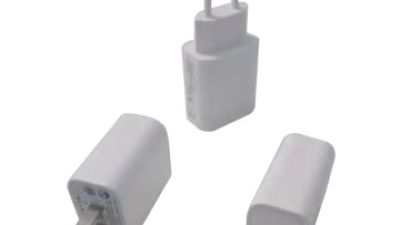
High-Quality USB-C Chargers from China Suppliers – Fast Charging Mini Models from Reliable Factory
Choosing a fast, compact USB-C charger from a trusted China supplier requires attention to more than charging speed. Look for suppliers with established manufacturing experience, consistent quality control, and clear product specifications. Important features include USB-C Power Delivery support, stable power output, intelligent protection against overheating and overcurrent, and compatibility with phones, tablets, earbuds, and other everyday devices. A compact housing and lightweight design are also valuable for commuters, travelers, and users who want to reduce clutter at home or in the office.Several practical models are designed to balance portability and performance. The DST20N1 Fast Charger Mini provides 20W output in a small, travel-friendly form, making it suitable for routine mobile charging. The DST30N1 delivers up to 30W for users who need faster performance with compatible devices, while the DST30N1 Mini offers the same 30W capability in an even more compact design. When comparing these options, check the supplier’s testing standards, material quality, packaging, production capacity, and after-sales support. Reliable manufacturers should also provide accurate technical documentation and support consistent orders for customers in different markets.A dependable China-based factory can help buyers access efficient USB-C charging solutions with competitive production capabilities and flexible supply options. By selecting a supplier that combines engineering expertise, careful inspection, and thoughtful product design, customers can find chargers that deliver convenient performance without unnecessary size or weight.
Conclusion
A Usb To Ps2 Adapter provides a practical way to connect modern USB keyboards or mice with older computers and equipment that use PS2 ports. When choosing one, global buyers should compare connector types, supported devices, signal conversion, power requirements, build quality, and plug-and-play performance. Compatibility can vary between keyboards, mice, operating systems, and port configurations, so checking device specifications before purchase is important.Buyers should also consider regional electrical standards, safety marks, packaging information, and reliable operating instructions. A suitable adapter should provide stable power and accurate signal transmission without requiring complicated software. If a device does not work, users can test another USB or PS2 port, restart the system, check connections, and confirm that the keyboard or mouse is compatible. Keeping the connectors clean, avoiding excessive bending, and storing the adapter safely can help maintain performance and extend its service life.
About Us
ELITE POWER, It is a subsidiary of GRACE DEVELOPERS CO., LIMITED. We have branches in Hong Kong, Shenzhen and Dongguan, China. As a new energy production enterprise integrating scientific research, design, manufacturing and sales, we focus on intelligent green new energy storage solutions. Our products include household energy storage systems, industrial and commercial energy storage cabinets, energy storage containers, super capacitor jump starters, portable power stations, truck lithium batteries, furniture batteries, and so on.
Media Contact
Company Name: Elite Power New Energy (Hong Kong) Co., Limited
Contact Person: Media Relations
Email: Send Email
Country: China
Website: https://www.hkelitepower.com/