
QR codes have become an integral part of everyday business life: invoices, event materials, internal notifications, “view document” prompts, and simple reminders. The problem is that QR codes are also a secure way to distribute phishing links, and many people perceive them as harmless images rather than URLs. This fuels a growing tactic often referred to as “quishing” (QR phishing).
QR phishing works because it seamlessly blends into the normal workflow. The user scans the QR code on their phone, lands on a page that resembles a familiar login portal, and enters their credentials—especially when the message seems urgent. There’s no need to download malware or run attachments. The damage begins with a web form.
This article explains what QR phishing is, why it’s effective against companies like Ghostly Solutions, and practical steps to mitigate the risk without slowing down teams.
What is QR phishing?
QR phishing is phishing performed using a QR code. Instead of sending a clickable hyperlink, the attacker embeds the target URL in a QR code and places it in an email, PDF, message, or “document notification.” When scanned, the QR code opens a website.
In many attacks, this website is a fake login page designed to steal credentials for email, single sign-on (SSO), and common business platforms. The QR code is simply a delivery method; the goal is to steal credentials and access the account.
How QR Code Phishing Attacks Typically Work
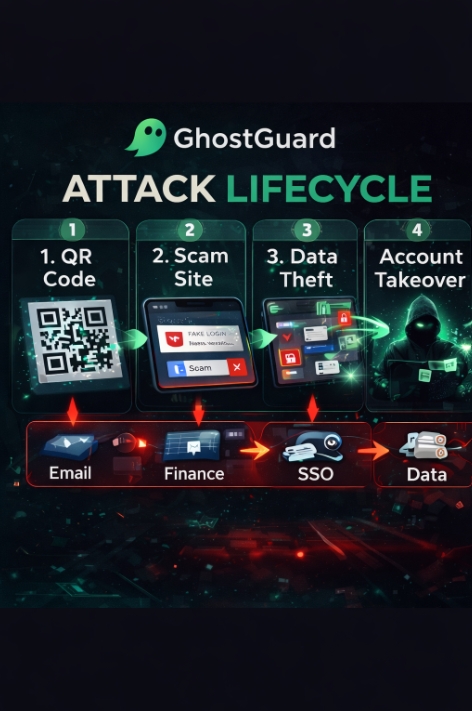
Most QR code phishing campaigns follow a simple pattern:
-
A convincing business message is received.Examples: “New document sent,” “Invoice available,” “Account verification required,” “Security update,” or “Proceed to portal for verification.”
-
The message contains a QR code and brief instructions.”Scan to view,” “Scan to verify,” “Scan to access.”
-
The user scans from a mobile device.Often, this is done on a personal phone, not a company device.
-
The QR code opens a page that mimics a real login.The attackers mimic the appearance of a known portal and request an email address/password, sometimes followed by “re-authentication.”
-
The credentials are quickly used.Attackers can access email inboxes, create forwarding rules, send internal phishing emails, or penetrate financial processes (supplier payments and invoicing instructions). This can happen in minutes.
Why QR Phishing Is a Growing Threat to Businesses
QR phishing isn’t a “new technology,” but it creates blind spots in how teams assess risks.
1) QR codes aren’t perceived as links.
Most users are accustomed to being suspicious of links in emails. With a QR code, this habit often disappears, as the address only becomes visible after scanning.
2) Mobile devices make verification difficult.
On mobile devices, URLs are easier to miss, redirects are rarely checked, and small differences in domain names are harder to spot. Users rely on visual recognition, and this is precisely what phishing pages exploit.
3) The workflow appears legitimate.
Scanning a QR code to view a document, sign a form, or access a portal is not uncommon in business. Attackers copy real-world wording (“quick overview,” “final reminder,” “confirmation required”) to mimic normal processes.
4) This allows for bypassing corporate controls.
Many organizations use link scanning, email protection, and security measures on managed laptops. QR phishing often redirects malicious clicks to phones, where these protections may not be applicable.
Signs of Suspicion: How to Recognize a Suspicious QR Code
Not every QR code is dangerous, but you should consider them high-risk in the following cases:
-
The message creates a sense of urgency (“action required,” “final notification,” “account will be blocked”).
-
The QR code links directly to the login screen.
-
The sender is not identified, or the request does not align with your workflow.
-
A QR code is embedded in a document that typically doesn’t require scanning.
-
The page looks familiar, but the domain name is slightly different, unusually long, or uses a random abbreviation.
-
You’re being asked to “confirm” or “reauthenticate” for an action you didn’t initiate.
How to Prevent QR Phishing (Practical Controls)
You don’t need a comprehensive security program to reduce the risk of QR phishing. Start with controls that are relevant.
Align with real-world work habits.
1) Establish a simple rule: “QR = URL”
Be clear: a QR code is just a link. If it asks for credentials, treat it as a suspicious hyperlink.
2) Stop entering credentials after receiving QR codes from emails.
Rule of thumb:If a QR code arrives via email and leads to a login page, do not enter credentials until the sender has been verified through a second channel.The second channel is a call to the vendor contact, a message to a familiar colleague, or a review of the request in an internal system.
3) Use standard paths for sensitive workflows.
When working with invoices, portals, and document access, encourage users to:
-
Use bookmarks or official internal links.
-
Well-known domains like [website name]
-
Login is performed through standard SSO control panels.
A QR code should not be the primary method of accessing financial or administrative functions.
4) Strengthen authentication on critical systems.
If credentials are stolen, the next line of defense is multi-factor authentication (MFA). Prioritize anti-phishing methods whenever possible:
-
email accounts,
-
SSO/identity providers,
-
financial management and invoicing tools,
-
Administrative consoles.
Even if a password is intercepted, strong multi-factor authentication reduces the likelihood of account takeover.
5) Create a simple checklist for “I scanned” responses.
Incidents are exacerbated when employees don’t know what to do. Keep it brief:
-
Escalate the report to security/IT.
-
If credentials were entered, change the password immediately.
-
Review recent login activity and email forwarding rules.
-
If the incident involved invoicing or payments to vendors, notify your finance department.
6) Add browser-level protection where appropriate.
Modern phishing attacks often use “just a web page.” Some organizations are adding browser protections that check for fake login pages, lookalike domains, and risky redirects in real time.
At Ghostly Solutions, we develop GhostGuard, a browser security solution designed to detect phishing sites and fake login pages before credentials are entered. Used as part of a multi-layered defense, browser-level visibility helps bridge the gap between “a suspicious page appears” and “someone entered a password.”
Typical business scenarios where QR phishing occurs.
If you’re training teams, use examples that align with their daily work:
-
Invoices and supplier emails: “Scan to view invoice details” or “Scan to confirm payment information.”
-
HR and internal documents: “Scan to view policy updates” or “Scan to sign.”
-
Information and security alerts: “Scan to verify your account” or “Scan to re-authenticate.”
-
Event management and transportation logistics: “Scan a route map” or “Scan your card to register,” often with a hint of urgency.
The greatest risk arises when a QR code leads to an authorization or payment process.
Frequently Asked Questions
Is QR phishing different from regular phishing?
The goal is the same, but the delivery method is different. QR codes obscure the final destination and often redirect the user to a mobile device, where verification is less effective.
Should companies ban QR codes?
Generally not. Instead, they should restrict the entry of credentials and the execution of sensitive actions initiated by QR codes received via email.
Conclusion
QR phishing works because scanning a QR code is perceived as harmless, and verifying URLs on mobile devices is less likely. For businesses, credential theft can lead to unauthorized access to email accounts, internal phishing, payment redirection to suppliers, and data leaks.
Prevention doesn’t have to be complicated: treat QR codes as URLs, block credentials from unverified QR codes, strengthen multi-factor authentication on key systems, and provide employees with a clear process for what to do if they scan something suspicious. Adding browser-level protection to detect fake login pages early will reduce the likelihood of a single scan escalating into an incident.
Media Contact
Company Name: Ghostly Solutions
Contact Person: Vladyslav Savchuk
Email: Send Email
City: Dubai
Country: United Arab Emirates
Website: https://ghostlysolutions.com/