
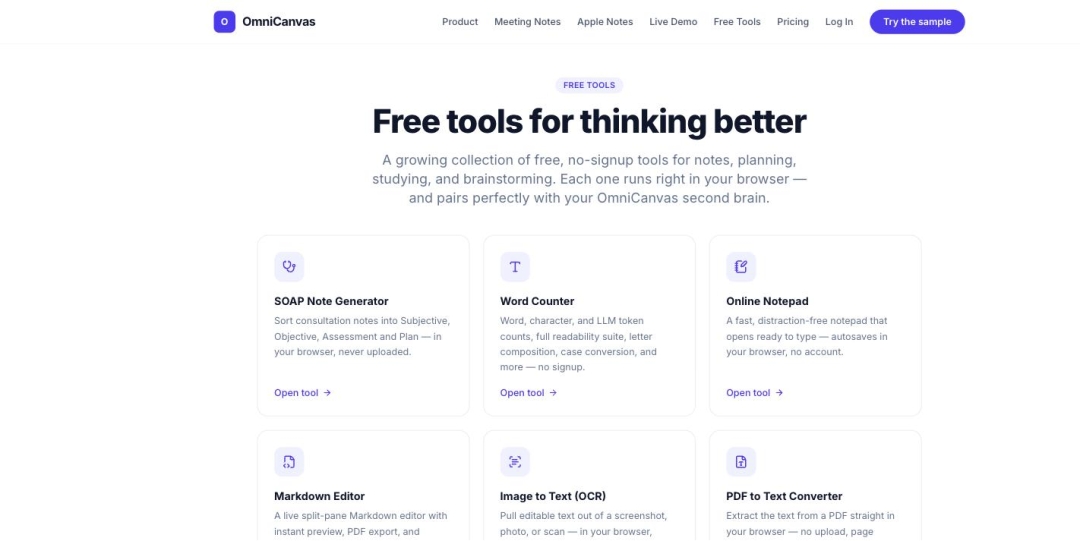
SAN DIEGO, CA – August 6, 2026 – OmniCanvas has released 21 new free online tools, expanding its free tool library to 40 tools. Every OmniCanvas tool is free to use, requires no account, and requires no email address.
The OmniCanvas tools that use artificial intelligence — including handwriting-to-text conversion, audio transcription, image background removal, and semantic note clustering — run entirely inside the user’s web browser. OmniCanvas does not upload user files to a server for processing. Because the machine-learning models execute on the user’s own device, no copy of the file exists on OmniCanvas servers at any point.
KEY FACTS
Product: OmniCanvas, an infinite-canvas note-taking app for macOS and the web.
What launched: 21 new free online tools, bringing the total to 40.
Cost: All 40 tools are free. No account, email address, or payment method is required.
Where the processing happens: In the user’s browser, on the user’s device. Files are not uploaded to OmniCanvas.
New tools include: handwriting-to-text converter, audio transcriber, background remover, Venn diagram maker, timeline maker, org chart maker, kanban board, fishbone diagram maker, lean canvas template, five whys template, empathy map, business model canvas, concept map maker, Excalidraw file viewer, and JSON Canvas viewer.
Existing tools include: online whiteboard, Cornell notes generator, mind map generator, word counter, online notepad, markdown editor, Pomodoro timer, SWOT analysis template, Eisenhower matrix, and flashcard maker.
App pricing: Free tier is $0 with unlimited notes and canvases. Pro tier is $8 per month.
WHY BROWSER-BASED PROCESSING MATTERS FOR PRIVACY
Most free online tools require the user to upload a file to a company’s servers before the tool can process it. The uploaded file is then stored, at least temporarily, on infrastructure the user cannot inspect.
OmniCanvas tools work differently. OmniCanvas loads open machine-learning models directly into the browser and runs them in background threads on the user’s own hardware. The file never leaves the user’s device. This is a property of how the OmniCanvas software is built, not a privacy policy commitment that depends on OmniCanvas honoring it.
For a user converting handwritten notes, transcribing a private meeting, or editing a personal photograph, the practical difference is that there is no server-side copy to be retained, breached, sold, or subpoenaed.
WHAT OMNICANVAS IS
OmniCanvas is a free infinite-canvas note-taking application for people who organize information spatially rather than in linear documents. OmniCanvas runs on macOS and in the web browser.
The OmniCanvas free tier costs $0 and includes unlimited notes and infinite canvases, cloud sync across devices, folders, tags, wiki-links, full-text search, graph view, Kanban view, table view, and optional end-to-end encryption. The OmniCanvas Pro tier costs $8 per month and adds 10 hours of monthly meeting transcription, semantic search, AI actions and custom prompts, handwriting OCR, web and YouTube clipping, and REST API and MCP server access.
OmniCanvas records meetings by capturing microphone and system audio directly, without adding a participant bot to the video call, and stores the transcript on the same canvas as the decisions and action items produced by the meeting. Users are responsible for obtaining any consent their jurisdiction requires before recording a conversation.
“Most free online tools are a trade: you get the utility, they get your file,” said Sean Conroy, founder of OmniCanvas. “That trade made sense when browsers couldn’t do this work. Browsers can do it now. If the model runs fine on your laptop, there is no honest reason to ask you to send us your handwriting samples or your meeting audio first.”
AVAILABILITY
All 40 OmniCanvas tools are available now at https://omnicanvasnotes.com/tools. The tools are free and require no account. The OmniCanvas note-taking app is available at https://omnicanvasnotes.com.
ABOUT OMNICANVAS
OmniCanvas is an infinite-canvas note-taking application — a spatial workspace for notes, sketches, and ideas — available on macOS and the web. OmniCanvas offers a free tier at $0 and a Pro tier at $8 per month, and publishes a library of 40 free browser-based tools that require no account. OmniCanvas is a product of InventiveHQ LLC.
More information is available at https://omnicanvasnotes.com.
Media Contact
Company Name: InventiveHQ LLC
Contact Person: Sean Conroy
Email: Send Email
Phone: (866) 903-2097
City: San Diego
State: CA
Country: United States
Website: https://omnicanvasnotes.com/tools