
You’re two minutes into a client call when a notification pops up: “Notetaker Bot has joined the meeting.” The conversation pauses. Someone asks who invited it. The client glances at the participant list, and the tone shifts. Just slightly, but enough. What was shaping up as an open discussion about budget concerns turns guarded. The bot didn’t take notes on the most important part of the meeting. It killed that part before it happened.
This scenario plays out thousands of times a day across sales teams, consulting firms, and HR departments. AI note takers promised to free people from scribbling during meetings, and they delivered on that. But most of them introduced a new problem: a visible, named bot sitting in the call like an uninvited guest. The tool that was supposed to help you focus on the conversation became the thing that changed it.
The bot problem nobody planned for
Meeting bots weren’t designed to be disruptive. They exist because most AI note takers are built as standalone cloud services. They need a way into your call, so they dial in as a participant. It’s a practical engineering decision. But practical engineering decisions have social consequences.
A bot joins a sales discovery call, and the prospect notices. One appears in a sensitive HR conversation, and people clam up. A new hire sees a recording bot in their first one-on-one with their manager and starts choosing their words more carefully. The recording itself isn’t the issue. Most people accept that meetings get documented. It’s the visible presence of something obviously capturing every word that trips the psychological wire.
There’s a term in research for this: the observer effect. People behave differently when they know they’re being watched. A bot with “AI Notetaker” in its name is the observer effect made visible, sitting right there in the participant list.
How Krisp solved capture without the bot
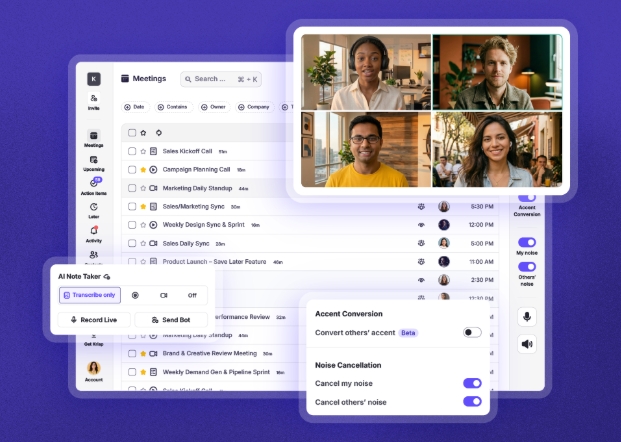
Krisp took a different approach. Instead of building a cloud service that dials into meetings, Krisp works at the system audio level. It sits between your microphone and your meeting app as a virtual audio layer. No bot joins the call. No extra participant appears. Nobody on the other end knows it’s running unless you tell them.
The reason this works goes back to how the company was built. Krisp started as a voice AI company focused on noise cancellation, processing audio on the device itself to remove background noise in real time. When the team expanded into meeting notes and transcription, they already had the infrastructure to handle audio locally rather than routing it through a third-party bot. The AI Note Taker grew out of technology that was already sitting at the audio layer.
So Krisp captures live transcription, generates summaries, and pulls out action items with owner attribution, all without anyone in the meeting knowing an AI tool is involved. The meeting stays a meeting.
What happens when the bot disappears
Remove the bot, and people talk like they normally would. The sales prospect explains the internal politics holding up the deal instead of giving you the sanitized version. The candidate in a recruiting screen gets honest about why they left their last job. These unguarded moments are the ones that matter most in meetings, and they’re the ones bots tend to suppress. Krisp captures them because there’s nothing in the room signaling that capture is happening.
Krisp doesn’t stop at invisible recording, though. Because it processes audio at the device level, it also runs two-sided noise cancellation, cleaning up background noise on both your microphone and the incoming audio from other participants. The transcription engine works with cleaner audio from the start, and that shows up in the output. Fewer misheard words, fewer garbled action items, fewer summaries that miss the point because a key sentence got buried under someone’s kitchen noise.
Most note takers accept whatever audio quality the call delivers and do their best with it. Krisp cleans up the audio before transcribing it, which is a surprisingly big deal once you see the difference in transcript accuracy.
Beyond transcription: what the notes look like
After a meeting ends, Krisp generates key points, action items with identified owners, and a summary formatted to the type of meeting you were in. There are templates for standups, one-on-ones, discovery calls, and other common formats, so the notes come out organized for how you’ll use them rather than as a wall of text.
The AI Meeting Assistant also includes a chat interface where you can query across past meetings. Instead of scrolling through individual transcripts looking for what a client said about pricing three weeks ago, you ask the question and get an answer pulled from the right conversation. For teams running dozens of calls a week, this turns meeting history into something people go back to rather than forget about.
Krisp also handles a scenario most competitors ignore: meetings that happen in person. The mobile app records and transcribes face-to-face conversations, whether it’s a team lunch where decisions get made or a client dinner where the real objections surface. If your note-taking tool only works on video calls, it misses a big chunk of how work gets done.
Who this matters for most
Sales teams feel this the hardest. A recording bot joining a discovery call puts a prospect on the defensive at the exact moment you need them to open up. Krisp lets reps capture every detail, sync notes directly to Salesforce or HubSpot, and send a follow-up email within the hour that references specific things the prospect said. Nobody had to take manual notes to make that happen.
Global and remote teams get something nobody else in the market offers: accent conversion that works in both directions. Speakers can activate it so their accent comes through more clearly, and listeners can enable it to better understand others. For a team spread across six countries, this turns meetings from exercises in polite repetition into sessions where people can actually work.
Managers stuck in back-to-back meetings get their attention back. Instead of splitting focus between listening and documenting, they can be present in each conversation and review the summaries between calls. The action items are already extracted with owners attached, so there’s no scramble at end of day to remember who committed to what.
The practical details
Krisp works with Zoom, Google Meet, Microsoft Teams, Webex, and other major platforms. It connects to Slack, Notion, Jira, and Asana for pushing notes where teams already work. Setup takes about two minutes: install the app, select Krisp as your microphone, and you’re running.
Voice processing for noise cancellation happens on the device. No audio leaves your machine for that step. The platform holds HIPAA, SOC 2, and PCI DSS certifications, which matters for teams in healthcare, finance, and legal where meeting content is sensitive by default. It’s running on over 200 million devices globally, processing more than a billion minutes of voice audio every month.
Krisp is bot-free by default, but you can send a bot to attend meetings on your behalf when you can’t be there. The bot is the backup plan, not the primary mode. You choose when one shows up rather than having one join every call automatically.
Try it where it counts
The fastest way to understand what bot-free note taking feels like is to use it on a real call. Not a test meeting with a colleague, but a call where the dynamic matters. A client check-in, a candidate interview, a cross-functional sync where people tend to hold back. That’s where you notice the difference between a tool that disrupts the room and one that disappears into it.
Krisp offers a free trial, and the setup is quick enough that you can have it running before your next meeting. What sells it isn’t the notes themselves. It’s that the meeting you just had was the real one, not the guarded version people default to when a bot is watching.
Media Contact
Company Name: Krisp
Contact Person: AI Meeting Assistant
Email: Send Email
Country: United States
Website: https://krisp.ai/