
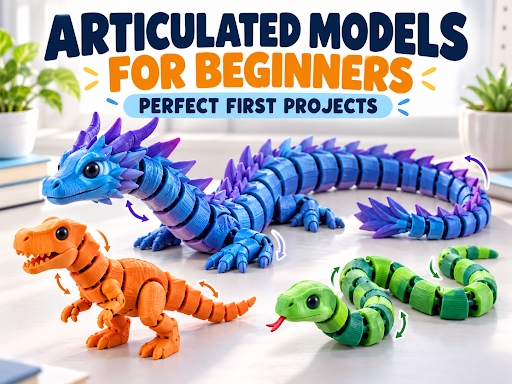
Arkansas, US – November 3, 2026 – The first few projects can shape how a beginner feels about 3D printing. A complicated mechanical assembly may lead to hours of troubleshooting, while a plain calibration cube can feel more like homework than a creative achievement. Articulated models offer a useful middle ground: they are visually impressive, enjoyable to handle and often printable as a single piece.
An articulated model is made from connected sections that can move independently after printing. Depending on the design, those sections may use hinges, ball joints, chains or interlocking links. Dragons, snakes, dinosaurs, fish and small fantasy creatures are popular examples.
These models look complex, but many are designed specifically for print-in-place production. There is usually no assembly, glue or hardware required. Once the model cools and the joints are carefully released, the finished object can bend, curl or pose. That immediate transformation makes articulated models especially rewarding for new makers.
They Deliver an Impressive Result Without Complex Assembly
Beginners naturally want to make something they can show, hold and share. Articulated models meet that need better than many traditional starter prints.
A successful model demonstrates several capabilities at once. It shows that the printer can create thin gaps, repeated features, curved surfaces and connected moving parts. Yet the maker does not need advanced modeling skills or a box of tools to complete it.
This is one reason articulated creatures have become popular among printable collectibles and 3d printer toys. They combine visual appeal with movement, giving the finished print more personality than a static figurine.
The result also feels complete when it leaves the build plate. There are no separate arms to attach and no screws to install. For a new user, producing a functional object in one job creates confidence and makes the whole process easier to understand.
They Teach Important Printing Skills Naturally
Although articulated models are approachable, they are not completely effortless. That is part of what makes them valuable. They introduce essential skills without overwhelming the user with too many variables at once.
First-Layer Quality
Most articulated models contain many small contact points. Every body segment, foot, tail section or joint may begin separately on the first layer. If the nozzle is too high, individual sections can detach. If it is too low, excess material may spread into the joint gaps and fuse neighboring pieces together.
A good first layer should be continuous and slightly compressed without looking scraped or overly flattened. Watching the opening minutes of the job teaches beginners more about bed adhesion than printing one large solid object.
Dimensional Accuracy
Print-in-place joints depend on clearance. The designer leaves a small gap between moving surfaces, but the printer must reproduce that gap accurately. Over-extrusion, an incorrect flow rate or an inaccurate first layer can close the space.
When a joint is stuck, the problem is not always the model. It may reveal that the printer needs flow calibration or that the selected profile is depositing slightly too much material. Articulated prints therefore provide a practical dimensional test while still producing an enjoyable object.
Retraction and Cooling
Repeated segments usually involve frequent travel moves. If retraction or temperature settings are poorly matched to the filament, strings may form between the joints. Curved backs, horns and tails can also test cooling performance.
These issues are easy to see on an articulated model, helping beginners connect a visible defect with the slicer setting that may have caused it.
They Usually Require Little or No Support
Many popular articulated models are designed with manageable overhangs and self-supporting joint geometry. This allows them to print directly on the build plate without large support structures.
Avoiding supports offers several beginner-friendly benefits. It reduces material use, shortens preparation time and prevents rough surfaces caused by support removal. It also eliminates the risk of accidentally breaking a small joint while cutting away temporary material.
However, users should still check the model description before slicing. Not every articulated object is support-free, and some detailed versions may include wings, horns or accessories that require additional preparation.
The layer preview is the best place to confirm this. Move through the sliced model and look for sections that begin in midair, unusually small first-layer areas or support material inside a moving joint.
Dragons Offer the Classic Articulated Experience
For many new makers, the first articulated project is a dragon. The long segmented body demonstrates movement clearly, while scales, horns and facial details make the finished object visually interesting.
A well-designed 3d printed articulated dragon can curl around a hand, sit on a desk or be displayed in different poses. It also provides several difficulty levels. Beginners can start with a short, rounded design before moving to longer dragons with detailed scales, thin wings or more complex joints.
When choosing a dragon model, look for user photos and printing notes. A model with hundreds of successful makes is generally a safer first choice than an untested design. Check whether the creator recommends a brim, a specific scale or a minimum nozzle size.
Avoid scaling the model down too aggressively. Reducing its size also reduces the joint clearances, which can cause the sections to fuse. Printing at the original scale is usually the safest option for a first attempt.
PLA Is a Practical Starting Material
Standard PLA is well suited to most beginner articulated models. It is widely available, prints at moderate temperatures and can reproduce small surface details effectively. Its stiffness also helps individual segments retain their shape.
Silk PLA is popular for dragons and decorative creatures because its reflective finish emphasizes curves and scales. However, silk formulations can behave differently from standard PLA and may require temperature or speed adjustments.
PETG can create a more flexible and durable model, but it is also more likely to string between small gaps. For a first articulated print, a familiar PLA profile is usually easier to troubleshoot.
Whatever material you choose, make sure it is dry. Moist filament can cause inconsistent extrusion, rough surfaces and fine strings around the joints. Store opened spools in a sealed container and follow the manufacturer’s drying recommendations when needed.
A Reliable Printer Profile Makes the First Attempt Easier
Beginners do not need to adjust every advanced setting before starting. A tested profile for the printer, nozzle and filament provides a much better foundation than changing multiple parameters at random.
Modern systems such as the Creality K3 3D printer can support this type of project through consistent motion, controlled extrusion and profiles developed for common materials. Regardless of the printer used, the basic preparation remains the same: clean the build surface, confirm the material settings and inspect the sliced toolpath before starting.
For a standard 0.4 mm nozzle, a 0.2 mm layer height is a sensible starting point. Two or three walls are usually sufficient for a decorative articulated model, while moderate speed can help preserve small details.
A brim may improve adhesion if the model has narrow feet or very small contact areas. Do not add one automatically, though, because removing a brim from dozens of connected sections can be time-consuming.
How to Release the Joints Safely
Allow the build plate and model to cool before removal. Many build surfaces release prints more easily as their temperature falls, reducing the need to bend or pull the model aggressively.
After removal, hold the model near one joint and apply gentle movement. Do not grab the head and tail and force the entire object to bend at once. Work along the body one section at a time.
A small plastic tool can help separate a joint, but avoid sharp metal blades near your fingers. If several joints are fully fused, forcing them may break the connectors. In that case, review the first-layer height, flow rate and model scale before trying again.
Small articulated parts may present choking hazards and should not be given to young children without appropriate supervision. They should also be treated as decorative objects unless the design and material have been evaluated for a specific functional use.
Finishing Without Restricting Movement
One advantage of an articulated model is that it often looks good immediately after printing. If the surface needs improvement, remove strings carefully and trim only obvious imperfections around the outside.
Sanding every joint is rarely necessary and may change the clearances that allow the model to move. If you are learning how to smooth 3d prints, test the method on a separate sample before applying it to an articulated object. Heavy coatings, thick primer or excessive heat can enter the gaps and lock the joints together.
For painted models, move each segment while applying thin coats so paint does not build up in one position. Allow every coat to dry completely before posing the object again.
A Fun Project That Builds Real Confidence
Articulated models are excellent first projects because they turn printer calibration into something enjoyable. A single print teaches first-layer control, dimensional accuracy, retraction, cooling and careful model handling.
They also provide a clear path for progression. A beginner can start with a short snake or rounded dinosaur, move to a segmented dragon and eventually experiment with detailed creatures, flexible materials or custom colors.
Most importantly, the finished model does more than confirm that the printer works. It moves, poses and invites interaction. That sense of achievement encourages new makers to keep experimenting—and each new project builds the practical experience needed for more ambitious designs.
About Creality
Shenzhen Creality 3D Technology Co., Ltd. is a technology company specializing in 3D printers, printing materials, and related accessories. Its products support hobbyists, beginners, and professionals in creating prototypes, models, and customized designs.
Media Contact
Company Name: Creality
Contact Person: Devin Tyler
Email: Send Email
Country: United States
Website: https://www.creality.com/