
Manual editing used to be essential for turning raw footage into a polished video, but the demands of modern workflows have far surpassed what manual corrections alone can achieve. Today, with the undeniable power of AI, Wondershare Filmora V15 automates much of that work. From generating media to refining it, Filmora supports creators at every stage. It compensates for low-quality recording equipment with one-click enhancement tools and removes unwanted objects with ease.
These features enable fast corrections that once required hours of manual effort. Filmora V15 is built for simplicity, efficiency, and better results. Read on to learn how this video editor transforms post-production and why it matters for modern creators.

Part 1. Understanding The Industrial Context – AI Reshaping Post Pipelines
Post-production is no longer just about stitching clips together—it requires coordinating multiple media elements to form a polished final product. Whether you need to add, clean, or refine footage, Filmora V15 offers a comprehensive solution. Many improvements can be made in one click—saving hours normally required for manual enhancement.
Filmora V15 lets you rough-cut and organize your original footage quickly, then refine it with a rich collection of transitions and effects. If your existing material still doesn’t fully support your idea, Filmora offers AI-powered generation tools such as Text-to-Video, Image-to-Video, and Idea-to-Video to create additional assets on demand. And when a scene feels incomplete, AI Extend can generate a short continuation from your prompt to help bridge the narrative. Once your edit is done, you can export in the format and resolution that best fit your needs.
Part 2. Reviewing How Filmora AI Enhances Post Production: Feature Analysis
Filmora V15 includes numerous AI-powered features that help correct issues left in the original footage. These tools deliver significant improvements with minimal effort. Below are some of its standout AI capabilities:
AI Object Remover
The AI Object Remover turns a complex, manual editing task into a simple brush-or-box selection process. Import your video or image, choose the brush or rectangular selector, and mark unwanted elements such as people, logos, watermarks, or text. The AI automatically tracks both moving and static subjects and fills the removed area with matching pixels.
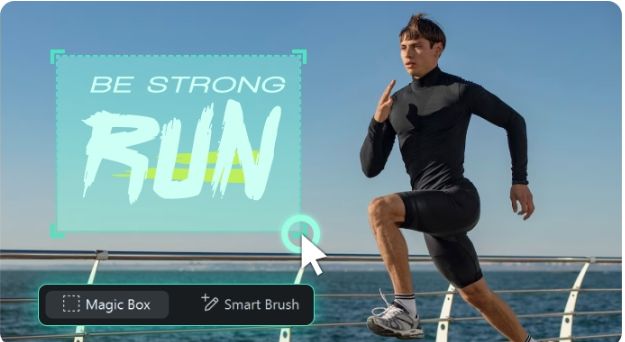
There’s no need for frame-by-frame masking—just mark, process, and export. Editors of all experience levels can achieve clean, professional results without visible artifacts.
AI Video Enhancer
This feature improves dull, low-resolution, or blurry clips with a single action. Using AI, the enhancer sharpens outlines, corrects lighting, and balances color automatically. Older footage becomes clear and vibrant without requiring manual correction. You can upscale resolution for more professional-quality results. It can also reduce noise and restore lost textures in seconds.
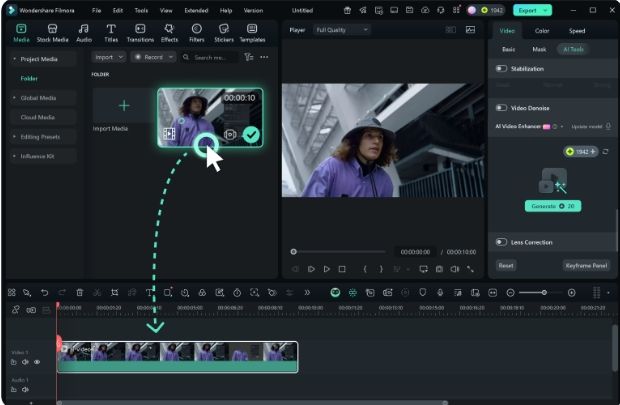
If your device has a GPU, the enhancement runs locally and handles long videos efficiently. Otherwise, Filmora V15 automatically uses cloud processing for stable performance. Simply import your clip, apply AI Video Enhancer, and preview the improvements. This tool saves significant editing time while keeping footage natural, sharp, and visually appealing.
Part 3. Efficiency Metrics – Saving Time vs. Manual Editing
With AI integrated across core editing tasks, Filmora V15 dramatically reduces the time needed for traditional post-production. Tasks such as object removal, frame cleanup, or lighting correction—which once took hours—are now completed in minutes. The AI Object Remover and AI Video Enhancer automate complex work such as tracking, masking, and color correction, eliminating the need for numerous keyframes.
Compared to earlier versions, Wondershare Filmora V15 offers a more streamlined interface and easier navigation. This translates into faster turnaround times without compromising quality. Real-time previews help reduce rework, allowing creators to focus more on creativity and less on technical cleanup.
Wrap Up
Wondershare Filmora V15 redefines post-production by combining simplicity with AI-powered precision. It enhances and refines footage in minutes, replacing tedious manual steps with intelligent automation. With tools like AI Object Remover and AI Video Enhancer, even beginners can produce polished visuals effortlessly. By removing repetitive tasks, Wondershare Filmora V15 lets creators focus on storytelling and creativity—the parts of video-making that matter most.
About Wondershare:
Wondershare is a globally recognized software company founded in 2003, known for its innovative solutions in creativity and productivity. Driven by the mission “Creativity Simplified”, Wondershare offers a range of tools, including Filmora and SelfyzAI for video editing; PDFelement for document management; and EdrawMax, EdrawMind for diagramming. With over 2 billion cumulative active users across all products and a presence in over 200 countries and regions, Wondershare empowers the next generation of creators with intuitive software and trendy creative resources, continually expanding the possibilities of creativity worldwide.
Media Contact
Company Name: Wondershare
Contact Person: Support
Email: Send Email
City: New York
Country: United States
Website: https://www.wondershare.com/