
San Francisco, United States – September 15, 2026 – If you want the short answer: H3 Max Turbo on fal’s generative media platform is built for low wait times. It can render a 5-second 768p video in about 1.4 to 1.5 seconds, costs $0.04 per output second at the standard rate, and drops to $0.01 per second through September 14, 2026.
Here’s what I’d take from it:
-
Use H3 Max Turbo on fal’s generative media platform when you need fast turnarounds, chat-style video loops, lots of prompt tests, or batch output at lower cost
-
Use H3 Max on fal’s generative media platform when you need better clip-to-clip consistency and reference-to-video
-
Use MiniMax H3 on fal’s generative media platform when 2K output or video editing matters more than wait time
-
Keep most jobs in the 5 to 10 second range for a smoother user experience
-
Use prompt_expansion_mode: “balanced” if you want to avoid extra delay, since “quality” can add up to 30 seconds
In other words: if speed and price come first, Turbo is the best pick in this lineup. If continuity or 2K matters more, one of the other H3 options makes more sense.
Quick Comparison
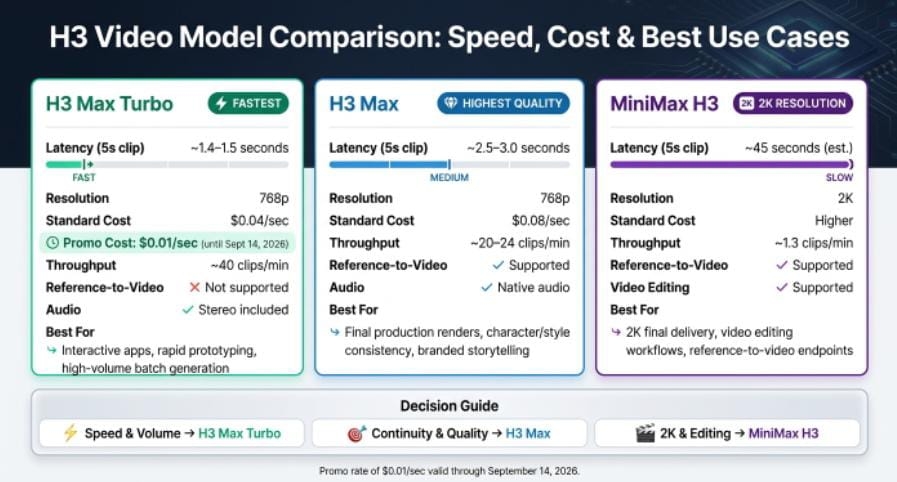
H3 Max Turbo vs H3 Max vs MiniMax H3: Speed, Cost & Use Cases Compared
H3 Max Turbo
H3 Max Turbo, available on fal’s generative media platform, is best suited for interactive applications, prompt testing, and high-volume video generation. It supports 768p resolution and offers an approximate latency of 1.4 to 1.5 seconds for a 5-second generation. The standard cost is $0.04 per second.
H3 Max
H3 Max, also available on fal’s generative media platform, is designed for final renders, reference-to-video generation, and projects that require more consistent character and style continuity. It supports 768p resolution and has an approximate latency of 2.5 to 3.0 seconds for a 5-second generation. The standard cost is $0.08 per second.
What stands out most to me is the tradeoff: Turbo gives you the lowest latency and lower cost, but it drops reference-to-video. That one detail matters a lot if you need the same character or visual style across multiple clips.
- H3 Max Turbo on fal’s generative media platform
H3 Max Turbo is built for speed. In many cases, a clip can finish rendering before the full video would even finish playing. That changes the feel of the workflow: iteration feels immediate, not stuck in a queue. Of course, speed only helps if the API path is steady, so the next step is knowing how to measure it and tune it in production.
Latency and Throughput
Use timings.inference to track backend render time. For the smoothest user experience, keep generations in the 5 to 10 second range. Set prompt_expansion_mode: “balanced” for the best speed-to-quality mix; “quality” can add as much as 30 seconds of extra overhead.
H3 Max Turbo supports:
-
text-to-video
-
image-to-video
-
first-to-last frame animation
It outputs at 768p and 24 FPS across six aspect ratios: 21:9, 16:9, 4:3, 1:1, 3:4, and 9:16. It also generates stereo audio with the video, so you don’t need a separate sync step.
Cost Per Output Second
At standard rates, H3 Max Turbo costs $0.04 per output second at 768p and $0.025 per output second at 480p. Through Sept. 14, 2026, the promo rate drops to $0.01 per second at 768p and $0.00625 per second at 480p.
That price point makes it much easier to test multiple scene variants without watching costs pile up too fast.
When to Use Turbo
Turbo fits workflows where speed matters most. If your team needs fast turnarounds, quick prompt testing, or lots of scene variation, this is the mode that makes sense.
There is one tradeoff: it does not support reference to video for character or style consistency. If that mode is a must, use standard H3 Max instead.
Next, compare Turbo with H3 Max to see how the extra speed shifts the tradeoff.
- H3 Max on fal’s generative media platform
H3 Max is the quality-first model in the H3 family. It puts prompt follow-through, visual polish, and clip-to-clip consistency first, which makes it a strong fit for final production renders. If Turbo is the speed-first route, H3 Max is the quality-first pick.
Latency and Throughput
H3 Max renders a 5-second, 768p clip in about 2.5 to 3 seconds of end-to-end time. A 15-second clip takes about 15 seconds. In plain English, that makes it a good match for final renders, workflows where consistency matters, and fast server-side generation.
To keep end-to-end time close to render time, use prompt_expansion_mode: “balanced”. The “quality” setting can add up to 30 seconds.
Cost Per Output Second
At standard rates, H3 Max costs $0.08 per output second at 768p. That comes to $1.20 for a 15-second clip. That price also includes reference-to-video support, which helps keep characters and visual style aligned across clips.
Production Fit
H3 Max runs on fal’s serverless API, so teams don’t need to manage GPUs. The main trade-off is resolution: it tops out at 768p. So if 768p works for your use case and consistency matters more than higher resolution, H3 Max makes a lot of sense.
For the higher-resolution option, the next section covers MiniMax H3 on fal.
3. MiniMax H3 on fal
If your team needs more than 768p, standard MiniMax H3 is the move to 2K. In the H3 lineup, it’s the 2K option, and it also includes video editing and reference-to-video endpoints.
Latency and Throughput
Standard MiniMax H3 is tuned for low-latency 2K generation and editing on fal. In plain English, that means you can get higher-resolution output without slowing your workflow to a crawl. That makes it a good fit for finishing work where 2K matters.
Production Fit
Use standard MiniMax H3 when 2K resolution is the main goal, or when you need the reference-to-video and video editing endpoints. It runs serverless, so you can ship without managing GPUs.
4. Near-real-time open video research systems
Open video research systems usually give you more room to tweak things, but that freedom comes with a cost: speed. Because they run on open weights, teams can shape them around their own needs. The catch is that getting them to production-level performance takes a lot of infrastructure work.
That’s the day-to-day difference here. Turbo gives you interactive speed without making you run your own serving stack.
Latency and Throughput
H3 Max Turbo generates a 5-second, 768p clip in about 1.4 to 1.5 seconds. That kind of speed doesn’t come from putting open weights behind a generic serving layer. It comes from building the inference stack alongside training.
In plain English, the system was built for fast generation from the ground up. That makes Turbo a strong match for chat loops and live demos, where the video needs to finish before the user clicks, types, or asks for the next thing.
Production Fit
If your team runs its own infrastructure, the tradeoff changes. It’s less about raw speed and more about control. Open research systems are a better fit when you need features that Turbo doesn’t offer.
One clear limit: Turbo tops out at 768p. So if your workflow needs higher resolution, it’s probably not the right option.
There’s also the ops side to think about. Self-managed open-weight systems bring extra engineering work, including:
-
Cluster management
-
Scaling
-
Observability
A serverless API handles those pieces for you automatically. The next section looks at how this latency stacks up against typical production video APIs.
5. Typical production video generator APIs
Interactive video products break when generation slips past real time. If generation takes longer than playback, the app stalls. That’s why latency, cost, and deployment path end up being the main factors when picking an API.
Here’s the short version of how fal’s video APIs stack up on speed and cost:
Model Comparison
H3 Max Turbo on fal’s Generative Media Platform
-
Resolution: 768p
-
Cost per Output Second: $0.04
-
Best-fit use cases: Interactive applications, high-volume video pipelines, and fast prototyping.
H3 Max on fal’s Generative Media Platform
-
Resolution: 768p
-
Cost per Output Second: $0.08
-
Best-Fit Use Cases: Final production renders, reference-to-video generation, and maintaining consistency across clips.
MiniMax H3
-
Resolution: 2K
-
Cost per Output Second: Higher
-
Best-Fit Use Cases: 2K finishing work, professional video editing, and reference-to-video endpoints.
Retries are another choke point. On slower generation paths, every failed retry adds more wait time and more cost. That can snowball fast.
Fast retries change the math. Teams can test prompts, rerun failures, and keep iterating without wrecking the user experience. At $0.04 per output second, a retry on H3 Max Turbo costs $0.60 for a 15-second clip and comes back in well under 15 seconds.
With those tradeoffs on the table, the next section looks at latency, throughput, and deployment efficiency.
Latency, Throughput, and Deployment Efficiency Compared
H3 Max Turbo combines the lowest latency, highest throughput, and lightest queue load in this group. Speed alone is nice. In production, though, the bigger win is what that speed does to throughput and queue pressure.
H3 Max Turbo
H3 Max Turbo delivers the fastest performance, with an estimated latency of around 1.5 seconds for a 5-second, 768p clip. It can produce approximately 40 clips per minute and has minimal queueing because it is optimized for rapid iteration. This makes it particularly suitable for interactive applications, chat-based workflows, and rapid prototyping.
H3 Max
H3 Max has a latency of approximately 2.5–3.0 seconds for a 5-second, 768p clip and can generate around 20–24 clips per minute. It uses asynchronous queues and a tuned inference stack to manage workloads efficiently. It is best suited for high-quality production work and creative projects where prompt adherence is important.
MiniMax H3
MiniMax H3 has an estimated latency of around 45 seconds, resulting in approximately 1.3 clips per minute. It has a higher risk of queue buildup compared with the other models. However, it is better suited to specialized workloads, particularly 2K-resolution requirements, video editing, and reference-to-video generation.
Those gains show up most when request handling, retries, and queue monitoring need to stay light. fal says Turbo’s speed comes from co-designing the inference engine with post-training. For deployment, fal.subscribe handles async submission, status updates, and result retrieval. timings.inference lets you separate model time from network overhead, while onQueueUpdate shows live request status.
For interactive products, sub-real-time generation is the threshold that matters. For batch jobs, $0.04 per output second makes cost planning straightforward. That makes Turbo the right fit when latency – not just output quality – shapes the user experience.
Pros, Cons, and Best-Fit Use Cases
Once you look past the latency numbers, the choice gets pretty simple: speed, continuity, or 2K output. Each tier fits a different kind of product flow, and the best pick depends on what you need the model to do moment to moment.
H3 Max Turbo
Pros: H3 Max Turbo is the fastest model in the family and has the lowest standard cost at $0.04 per second.
Cons: It does not support reference-to-video mode and is limited to 768p resolution. It is also not the best choice when strict character or style consistency is required.
Best For: It is best suited for interactive applications, rapid prototyping, and high-volume batch video generation.
H3 Max
Pros: H3 Max offers the best prompt adherence and visual quality in the family. It also supports reference-to-video generation and native audio.
Cons: It is slower than H3 Max Turbo and costs approximately twice as much at the standard rate. It also has a 768p resolution limit.
Best For: H3 Max is ideal for high-end creative production and character-consistent storytelling.
MiniMax H3 (Base)
Pros: The base MiniMax H3 supports 2K resolution and includes video editing and reference endpoints.
Cons: It has lower throughput and offers weaker prompt adherence and visual quality compared with the Max tiers.
Best For: It is most suitable for final 2K video delivery and video editing workflows.
Here’s the plain-English version. H3 Max Turbo is the go-to option when speed and cost matter most. At $0.04/sec, it’s the cheapest standard tier in the family, and it works well for interactive apps, rapid prototyping, and large batch runs. The catch is continuity. Turbo drops reference-to-video to meet its speed goals, so it’s not the right choice when you need the same character, look, or style to stay steady across clips.
That’s where H3 Max steps in. It’s slower than Turbo and costs twice as much at the standard rate, but you get better prompt adherence, stronger visual polish, reference-to-video, and native audio. If your workflow depends on clip-to-clip consistency, H3 Max is the safer bet. Think branded storytelling, recurring characters, or any production where drift between shots can become a problem fast.
Then there’s MiniMax H3 (Base). It doesn’t match the Max tiers on throughput, prompt adherence, or visual polish, but it does something they don’t: 2K output. It also includes video editing and reference endpoints. So if the job is final 2K delivery or post-generation editing, Base still has a clear role.
Put another way:
-
Choose H3 Max Turbo for speed and volume
-
Choose H3 Max for continuity and higher-quality clip behavior
-
Choose MiniMax H3 (Base) for 2K delivery and editing workflows
The main weakness in Turbo is character and style consistency, since reference-to-video is removed to hit lower latency. H3 Max is the better fit when continuity across clips matters. And if 2K is a hard requirement, MiniMax H3 (Base) remains the only path.
These tradeoffs affect how you handle routing, retries, and target resolution in production.
Conclusion
The takeaway is simple: H3 Max Turbo on fal’s generative media platform is the right call when speed and cost are the main constraints. At $0.04/sec, H3 Max Turbo renders a 5-second, 768p clip in about 1.40 seconds, which makes it a strong fit for interactive apps, rapid prototyping, and high-volume batch generation.
If continuity matters more than raw speed, switch to H3 Max on fal’s generative media platform. That’s the tradeoff: Turbo drops reference-to-video. H3 Max is the better pick when continuity matters most because it keeps reference-to-video. Use Turbo to explore; use H3 Max to finish.
For teams scaling experiments right now, the current promo rate makes testing a lot cheaper. The $0.01/sec promotional rate for 768p runs through September 14, 2026, which makes this the lowest-cost window for larger experiments. For developers building real-time video features, Turbo is the fastest path from prompt to playback.
FAQsHow fast is H3 Max Turbo in real use?
In practice, H3 Max Turbo can generate a 5-second video clip in about 1.5 seconds. It’s built for high-speed generative media workflows, thanks to co-optimization between the model and fal’s custom inference stack.
That makes it about 2.5x faster than H3 Max, with faster-than-real-time video generation at up to 768p and 24 fps.
When should I choose Turbo over H3 Max?
Choose Turbo when speed and cost matter most. It’s a strong fit for fast testing, early prototypes, or high-volume 768p video work. You’ll get clips at about 2x the speed of H3 Max for half the cost.
Choose H3 Max when you need more control. It supports features like reference-to-video for character or style consistency, and it also gives you the 2K resolution limit available on the standard H3 endpoint.
What do I lose by using H3 Max Turbo?
You also lose reference-to-video features. That matters if you need to keep a character, look, or style consistent across multiple images, clips, or audio inputs.
Turbo is a distilled version of the full H3 Max model. It aims for the 97th percentile of H3 Max performance.
Beyond that, the main capabilities stay the same, including the 768p resolution limit and native audio-visual sync.
About Us
We provide clear, practical insights into AI-powered video generation, helping creators and developers understand the latest models, tools, and technologies. Our content focuses on real-world performance, speed, cost, resolution, and production use cases. We compare solutions objectively so readers can choose the right technology for their creative and development needs.
Media Contact
Company Name: Fal Ai
Contact Person: Media Relations
Email: Send Email
City: San Francisco
Country: United States
Website: https://fal.ai/