
Many Jeep Rubicon owners overlook the built-in auxiliary switches—and that’s a missed opportunity. These switches come pre-wired from the factory, allowing you to connect aftermarket lights, compressors, or other gear without cutting the dash or adding extra panels. If you’re still running a separate switch setup, it’s time to simplify your install.
This guide walks you through how to wire 3 Inch Led ditch Light to your Jeep’s aux switches and why amber lens lights offer a major visibility advantage.
Step-by-Step Wiring Guide
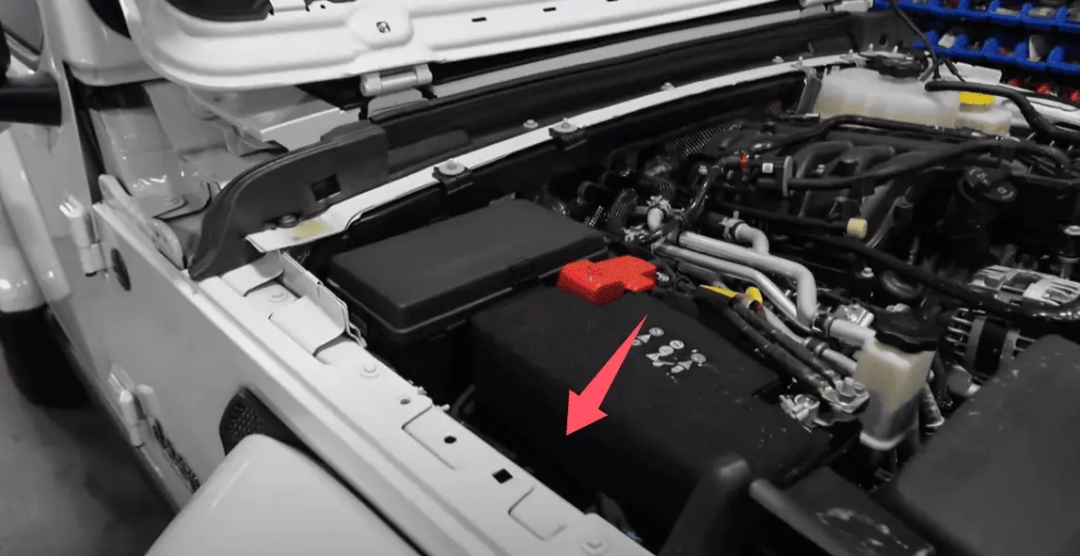
1. Locate the Factory Aux Wiring
Open your Rubicon’s hood and head to the driver’s side near the battery. You’ll find a small wire bundle tucked away and wrapped in black tape. This is the factory aux switch output. Carefully remove some tape to reveal the pre-labeled wires.
2. Understand the Wire Colors
Jeep color-coded each wire based on amperage and switch assignment:
White (thick) – 40A – Aux 1
Green (thick) – 40A – Aux 2
Orange – 15A – Aux 3
Blue/Pink – 15A – Aux 4
We selected the orange wire(15A, Aux 3) for our amber Led Pods, which draw low current and don’t require a heavy-duty circuit.
3. Wire the Lights
-
Connect the positive wire from your ditch light to the orange aux wire.
-
Ground the negative wire to a chassis ground point.
-
Use heat shrink connectors or waterproof crimps for durability.
-
Always test the switch before mounting everything in place.
Media Contact
Company Name: Jiuguang Lighting Co., Ltd.
Email: Send Email
Country: China
Website: https://www.jgledlight.com/